How it works

Syntax
Exchange

Structured speaking games for language exchange partners.

From isolated words to intuitive syntax. From syntax to fluency.
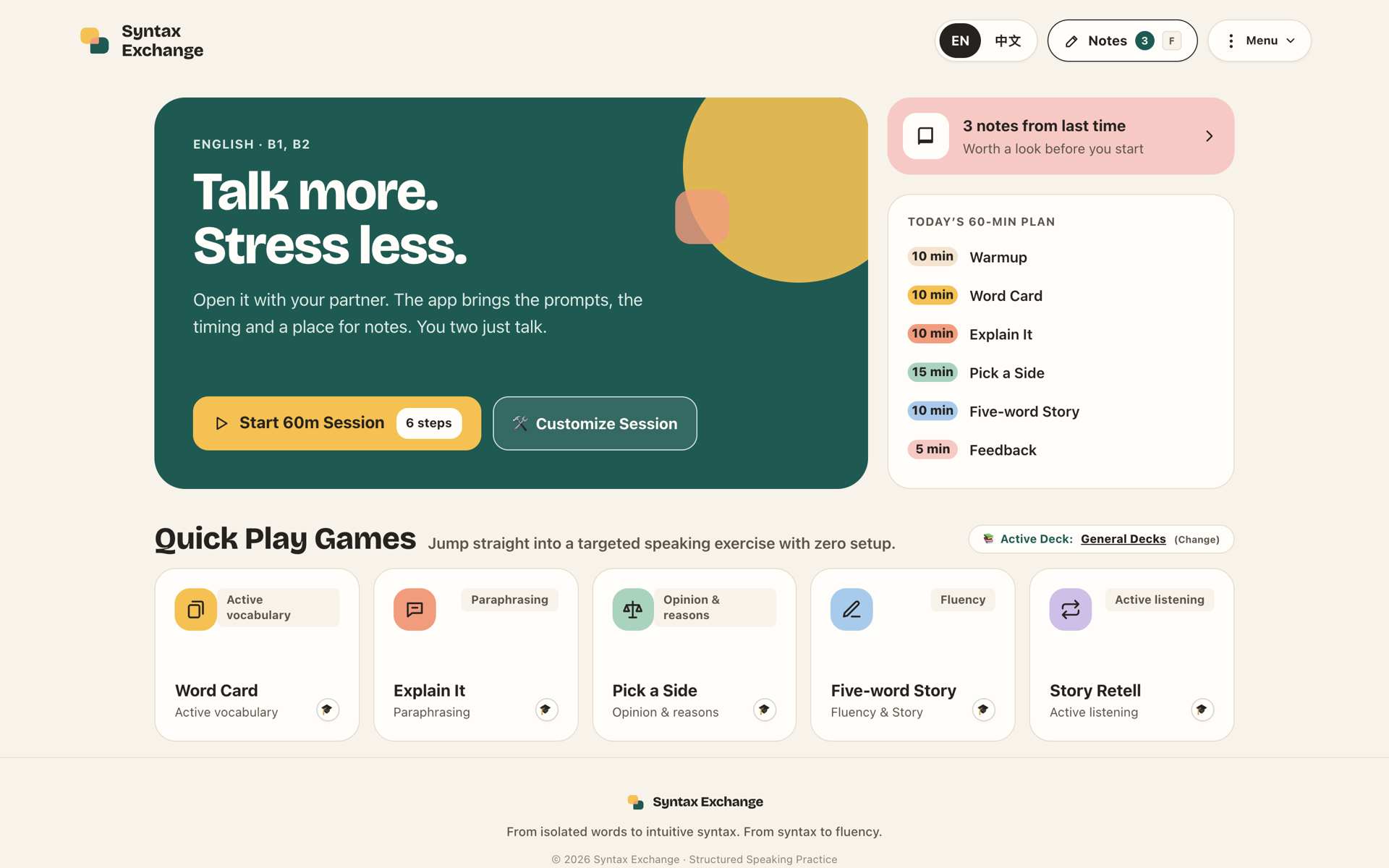
Syntax Exchange home screen
6 speaking games Designed around SLA research EN · 中文 · 日本語 · ES
01 · The problem

Language exchange stalls
without structure

1
Nothing to talk about

Partners spend the first minutes of every session searching for a topic.

2
Small talk, no goal

Practice drifts into casual chat with no clear learning target.

3
Words stay passive

Learners recognize vocabulary but can’t pull it up while speaking.

4
Feedback feels awkward

Partners don’t know when or how to correct each other without breaking flow.

5
Prep every week

Someone has to find fresh material before each meeting.

6
Mistakes come back

Last week’s errors are never reviewed, so they repeat and fossilize.

02 · The solution

Open the app.
Just talk.

Syntax Exchange brings the prompts, the timer and a place for notes to your weekly language exchange. No prep and no scores: 30 to 60 minutes of structured, playful speaking practice.

01PlayDraw a card or a topic.
02SpeakPut the screen aside and talk.
03ExplainParaphrase what you don’t know.
04RespondChallenge and answer your partner.
05FeedbackJot corrections silently.
06ReviewGo over notes, then repeat.
6speaking games
30/60min guided sessions
0prep · scores
Brand · The mark
64-unit grid · radius 10 · tail radius 3

Two voices.
One exchange.

Marigold · Voice A

The learner speaking: warm, bright, in the lead.

Pine · Voice B

The partner answering: calm, steady, supportive.

Coral · The overlap

Where both voices meet. That shared space is the exchange.

One sharp corner each

Every bubble keeps one pointed tail, aimed at the other voice.

App icon · favicon
03 · Core features

Six games.
One skill each.

W
Word Card
Active vocabulary

Draw a word and meet one of four challenges: a sentence, an explanation, a question for your partner, or a mini-story.

E
Explain It
Paraphrasing

Describe a secret word in 60 seconds without saying any of its five forbidden words.

P
Pick a Side
Opinion & reasons

Take a side on a dilemma using a 4-step frame: opinion, reason, example, challenge.

F
Five-word Story
Fluency

Link five random words into one coherent 2-minute story, ticking each off as it lands.

R
Retell
Active listening

Partner A tells a 2-minute story. Partner B listens without notes, then retells it.

D
Describe & Draw
Information gap

Only you see the picture. Describe it so your partner can draw it, then compare.

Core features · Vocabulary

From knowing a word to using it

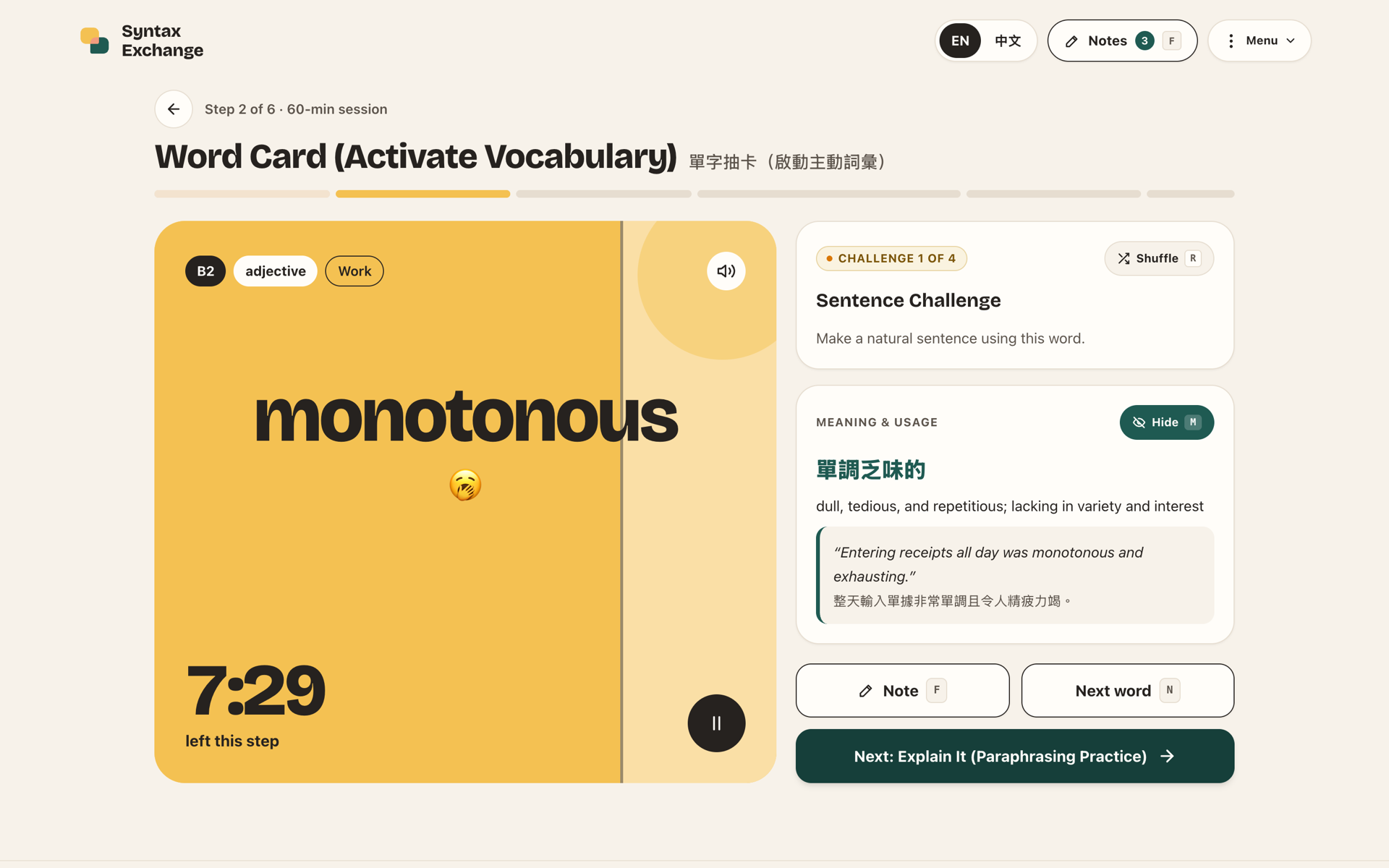
Word Card screen with the meaning revealed
Word Card
  • CEFR-leveled cards, A2 to C2, never repeated too soon
  • Meaning stays hidden until asked (M); P reads it aloud
  • In a session, the card itself is the timer: its color drains
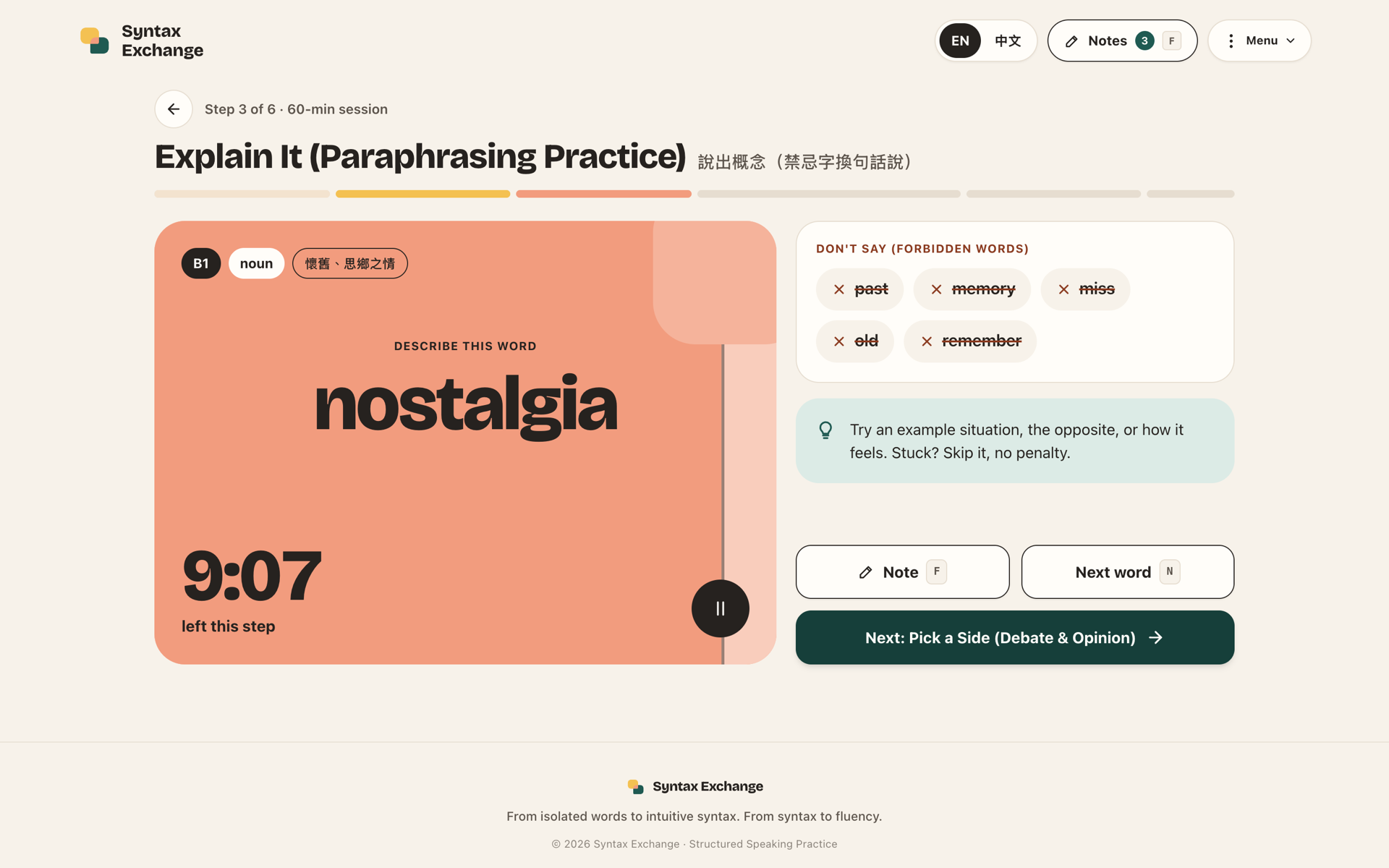
Explain It screen with forbidden words
Explain It
  • Five forbidden words per card force real paraphrasing
  • 60-second turns, skip with no penalty
  • Strategy tip: examples, opposites, feelings
Core features · Speaking

Longer turns, real conversation

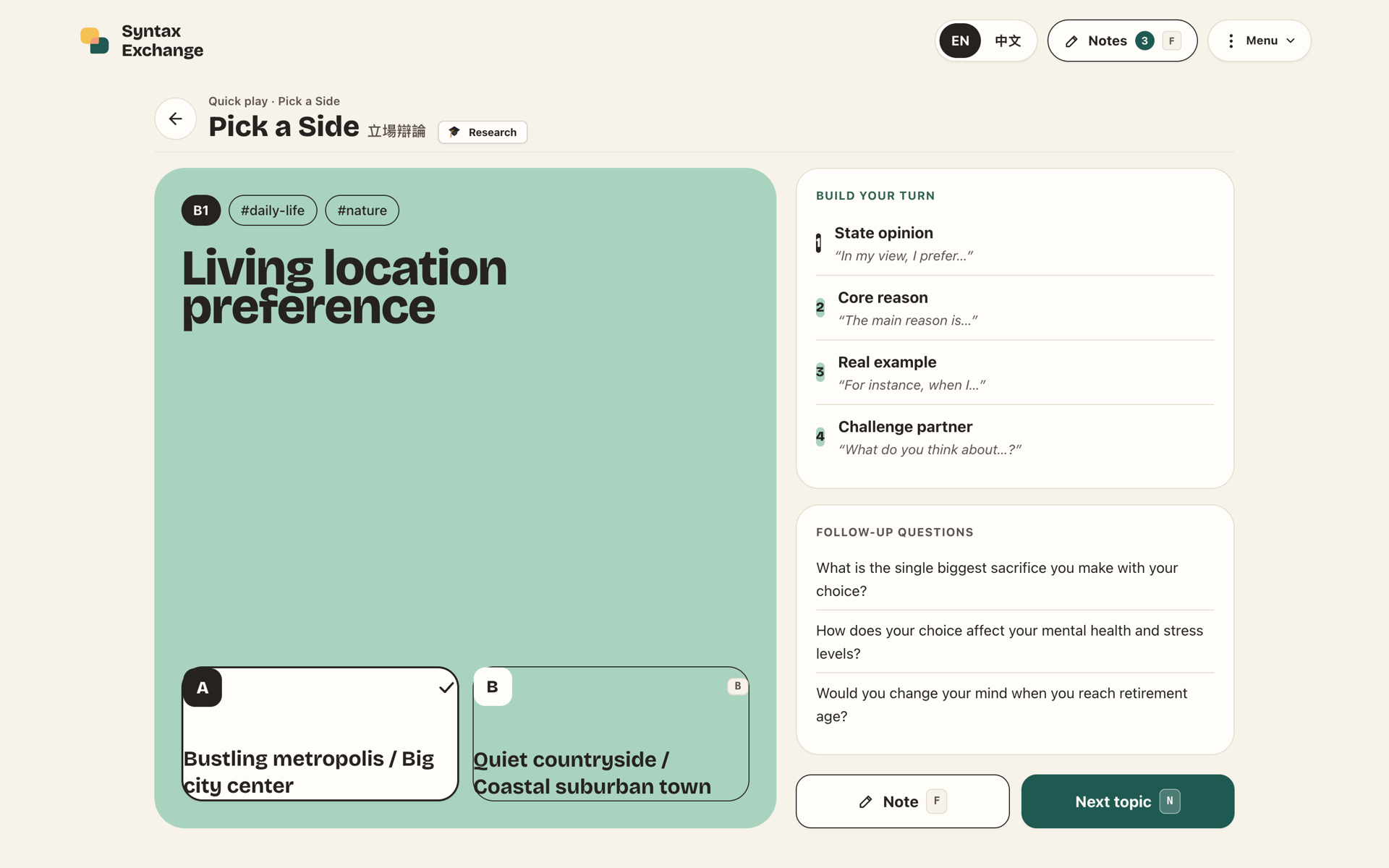
Pick a Side screen
Pick a Side
  • Dilemmas from daily life to AI and careers
  • Sentence starters for each of the 4 steps
  • Follow-up questions keep the debate going
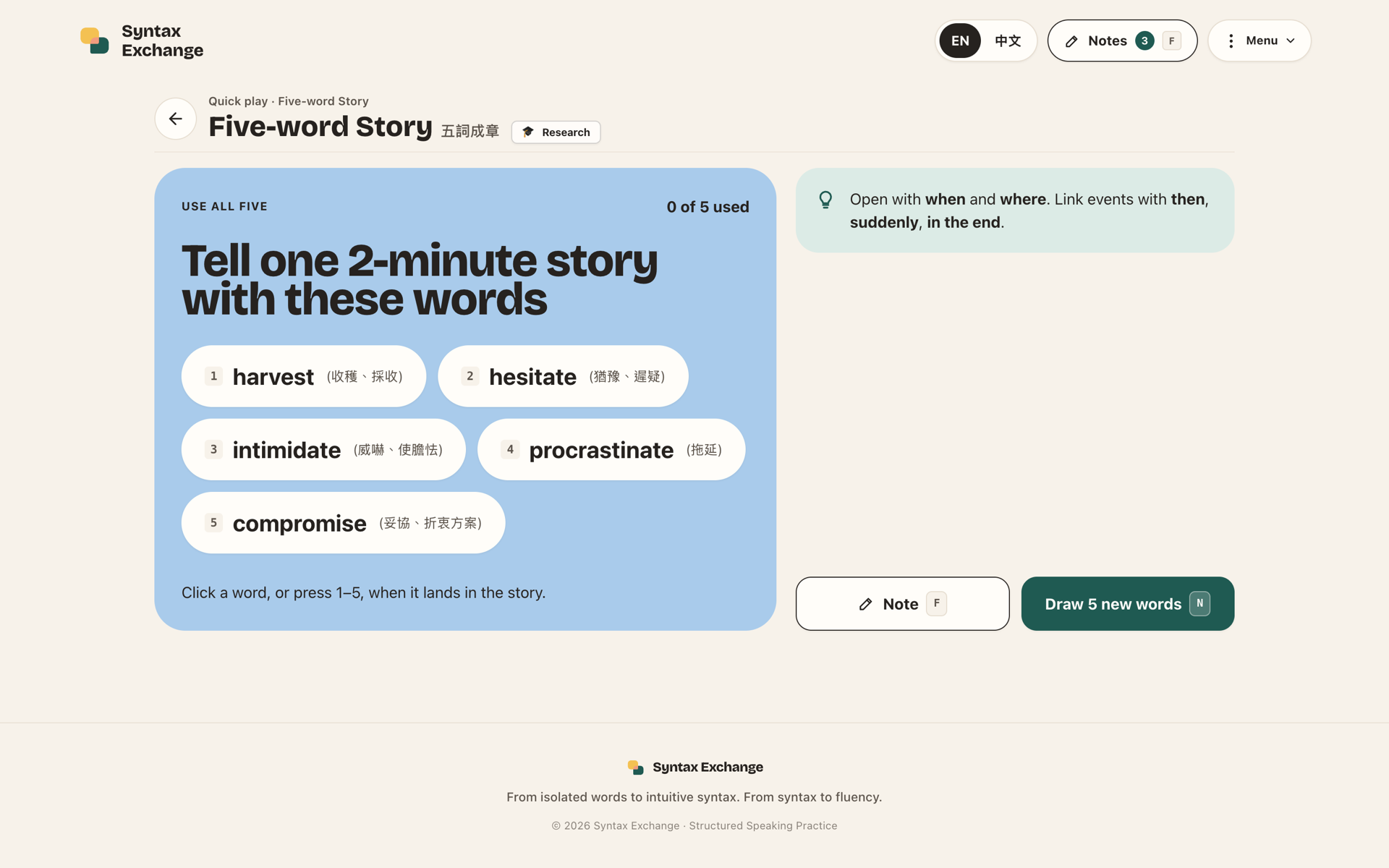
Five-word Story screen
Five-word Story
  • Five random words with their translations
  • Tap or press 1–5 as each word is used
  • Connector hints: then, suddenly, in the end
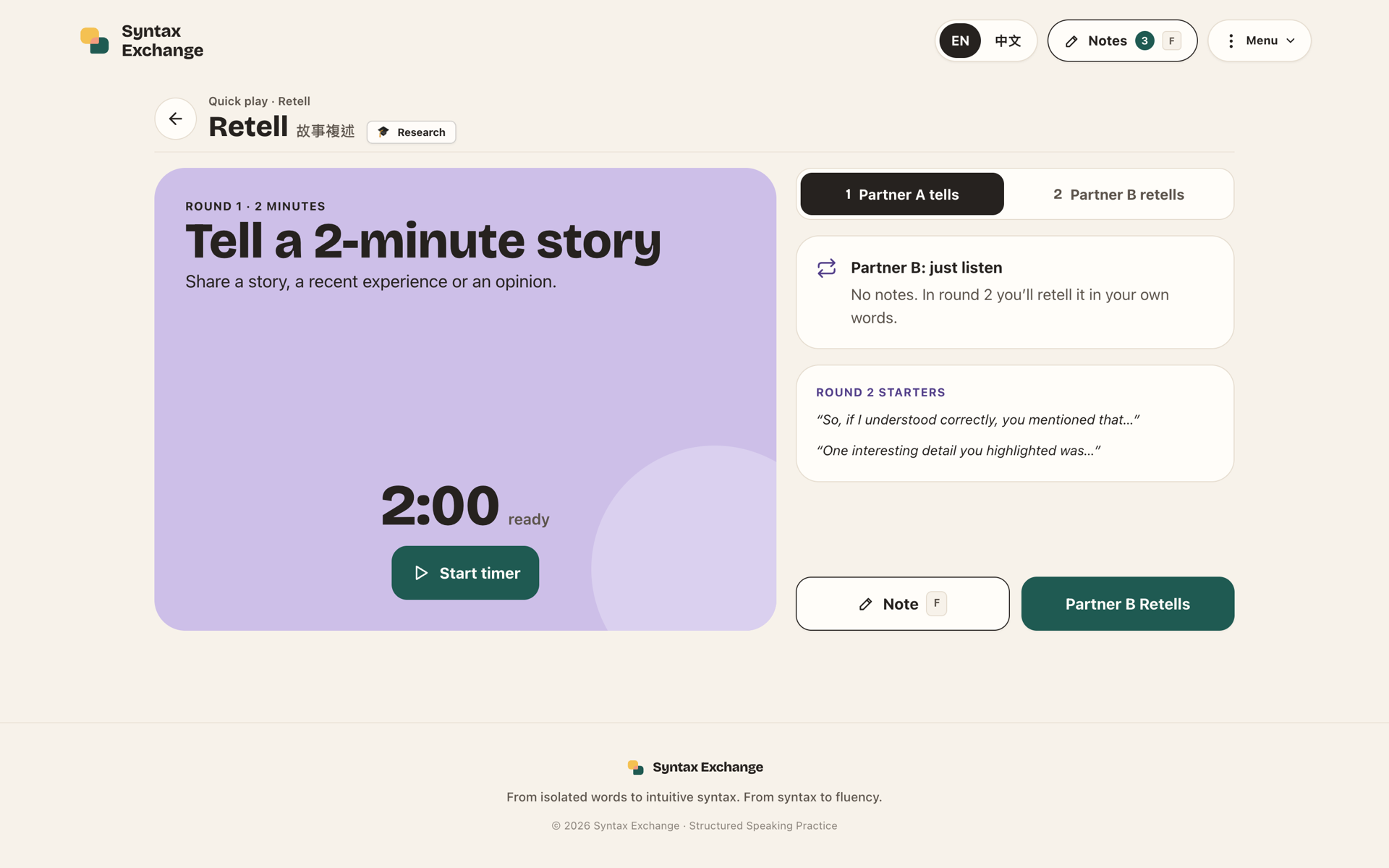
Retell screen
Retell
  • Two rounds: A tells, B retells
  • No notes allowed for the listener
  • Retell starters: “So, if I understood correctly…”
Core features · Describe & Draw

Describe it. They draw it.

PICTURE 3 · A2 OBJECTS2:41
A describes
  • Only A sees the picture: objects at A2–B1, shapes at B2–C1
  • Pictures are generated by code, in every practice language
  • 3-minute timer; N swaps in a new picture
Done
B draws
  • Remote room: B draws on an in-app canvas
  • One device: B draws on paper
  • B asks questions, then presses Done (Enter)
OriginalDrawingDid the drawing get these?2 / 3 detailsblue house on the leftyellow sun in the top rightred ball in the bottom right
Reveal together
  • Picture and drawing side by side
  • A shared detail checklist: tick with 1–9
  • Useful words to read aloud. No scoring
Core features · Session loop

Plan, practice, review

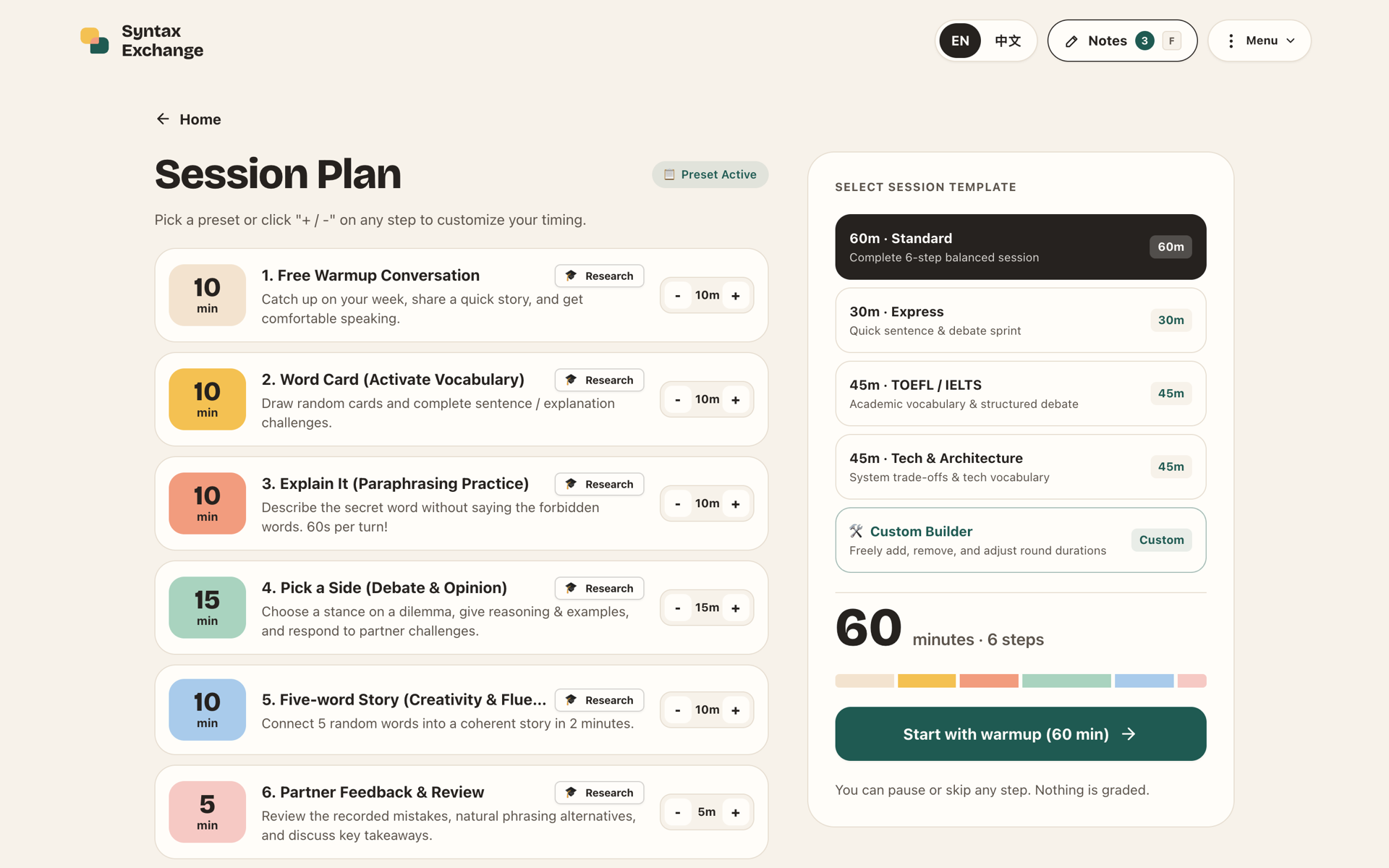
Session plan screen
Guided sessions
  • 60-min standard and 30-min express plans
  • Templates for TOEFL / IELTS and tech talk
  • Builder: reorder, toggle and retime steps; skip mid-session
  • Step timer drains the game card; coral in the last 15s
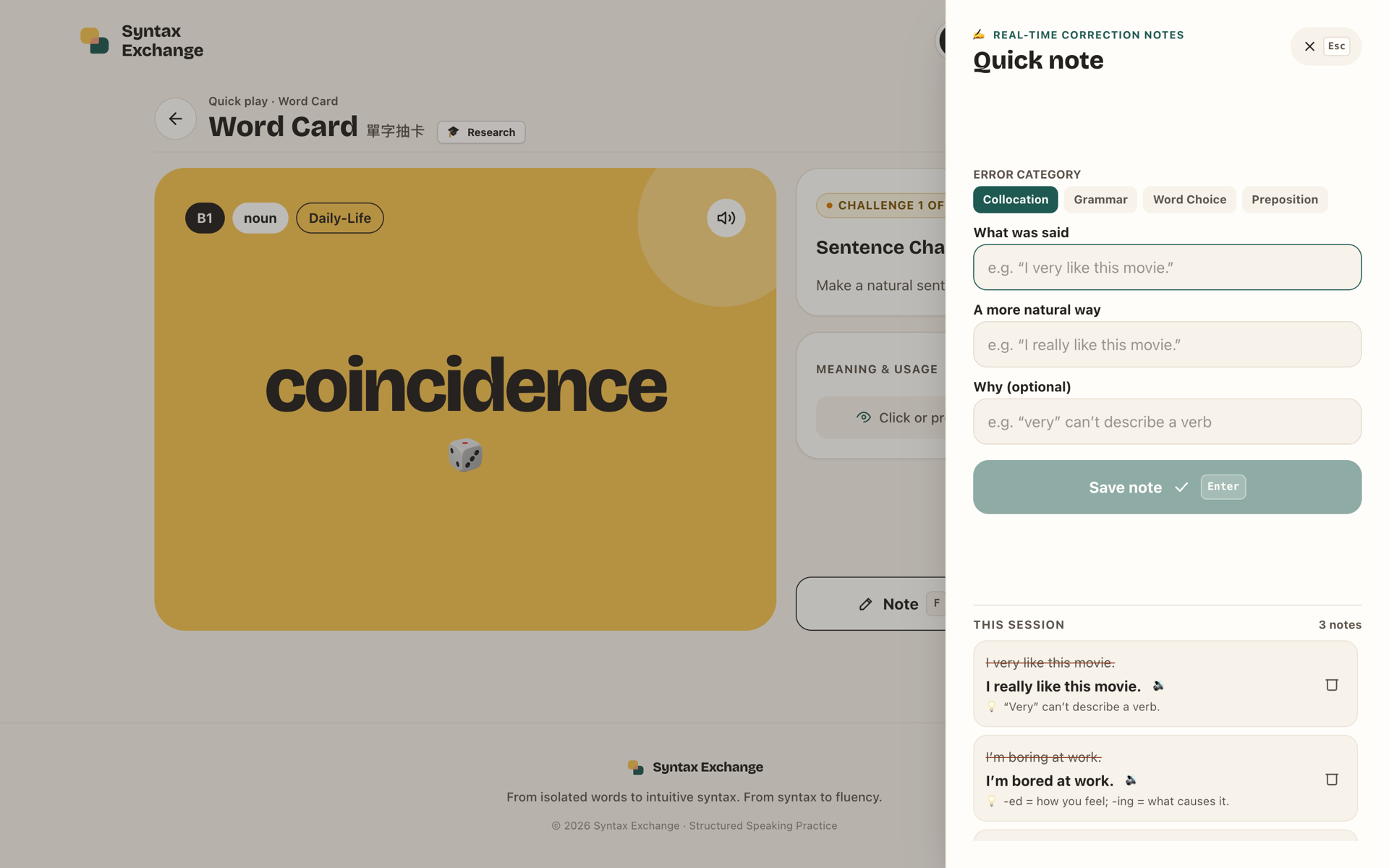
Quick note panel
Quick notes
  • Capture what was said and a more natural way
  • Tag by category: grammar, collocation, word choice
  • One key (F) opens it without stopping the talk
  • In a room, a note goes to your partner’s own notes
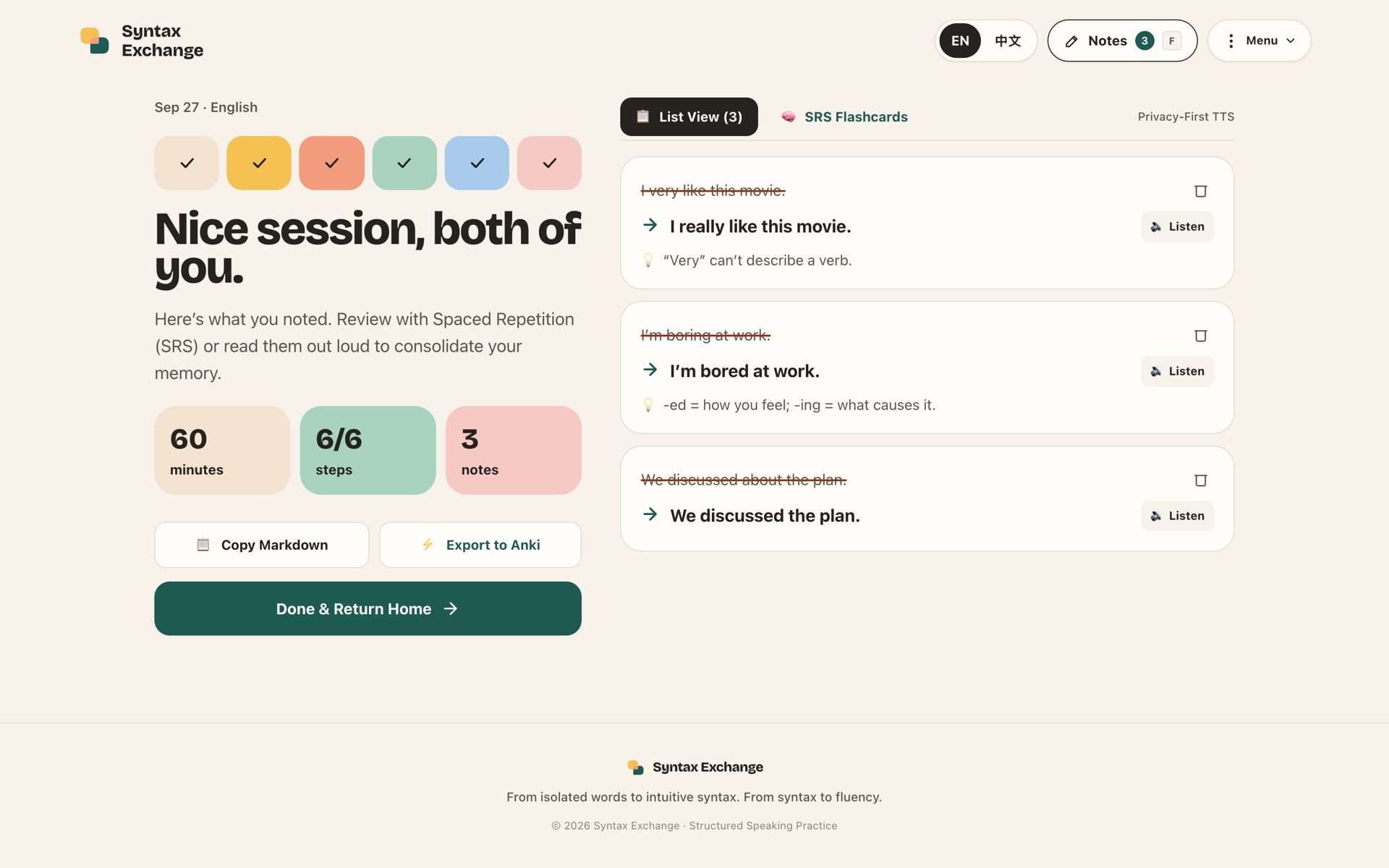
Session complete review screen
Review
  • Read any correction aloud in review
  • Spaced-repetition review with read-aloud
  • Export to Anki, CSV or Markdown
Core features · Practice Tree

Grow with every conversation

My tree
  • 1 leaf for every 10 minutes of active practice
  • Flowers for the cards you review
  • Fruit at milestones: first session, 5 sessions, 10 hours
Pair trees
  • One tree for each partner you practice with
  • Leaf colors show whose language was practiced
  • A balance meter: give your partner a turn
Why it works
  • Counts active practice time, not taps
  • Weekly, not daily: fits pairs who meet once or twice a week
  • Never wilts: a missed week is just resting
  • No streaks, no leaderboards
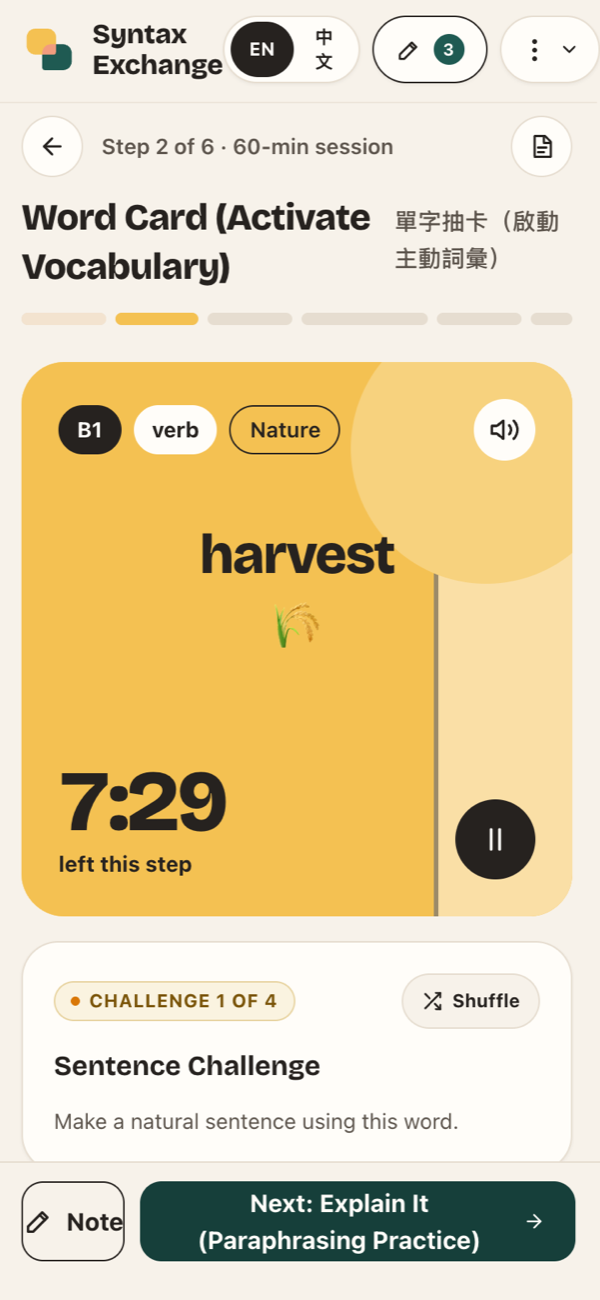
Word Card on a phone
Core features · Platform

Built for the table,
not the classroom

2
Two-layer language

Buttons in your language, content 100% in the target. Swap the pair in one click.

B1
4 languages, CEFR

English, 中文, 日本語 and Español content, graded A2 to C2.

↔
Remote rooms

Share a link or code: same game, word and timer on both screens. Talk on any call app.

G
Sign-in & sync

Sign in with Google to keep notes, decks and sessions on every device.

CSV
Your own decks

Built-in decks, or import your own from CSV or JSON, with forbidden words.

P
Privacy-first

Never records your voice: no microphone, no audio upload.

Core features · Shortcuts

Eyes on your partner,
not the screen

One key for every action in a session. Each button shows its key, and ? opens the full guide.

Anywhere
?H
Shortcuts guide, any time
F
Quick note, without stopping the talk
D
Switch or manage decks
S
Settings: language pair, audio, CEFR
Esc
Close any dialog or sheet
During a game
Space
Start or pause the timer
N
Next card, topic or picture
M
Show or hide the meaning
R
Shuffle the challenge
P
Pronounce the word
Game-specific
AB
Pick a Side: choose your side
1–5
Five-word Story: tick a word
Enter
Describe & Draw: Done / Reveal
1–9
Describe & Draw: tick a detail
Enter
Notes: save the note
Core features · Under the hood

Local-first. Private by design.

Content layer100% target language: words, forbidden words, topics and pictures, graded A2–C2 and generated offline.
UI shellYour base language: buttons, timers and labels stay familiar, so attention goes to speaking.
Game rulebooksEach game’s rules are pure functions, shared by one-device play and remote rooms. Session builder · spaced review · read-aloud · Screen Wake Lock.
BackendNo server of our own: Supabase Auth (Google), Postgres with row-level security, Realtime for rooms, RPC. Saved on the device first, synced when signed in.
React 18TypeScriptViteTailwindSupabaseCloudflare PagesVitestpgTAP
No recording, ever

No microphone access and no voice upload. Read-aloud uses the browser’s speech synthesis.

Your data, your account

Without an account, notes stay in this browser. Signed in, they sync to your own account, protected by row-level security.

Tested

Vitest for the app and the game rules; pgTAP for the database’s access rules.

04 · SLA research

Every step maps
to a theory

Each part of a session is designed around second language acquisition research, and every game shows its citation in-app.

Session step
Target skill
Theory
Source
Warmup
Lowering anxiety before harder tasks
Affective Filter Hypothesis
Krashen (1982)
Word Card
Active vocabulary retrieval
Retrieval practice / testing effect
Roediger & Karpicke (2006)
Explain It
Paraphrasing & circumlocution
Comprehensible Output Hypothesis
Swain (1985, 2005)
Pick a Side
Structured argument, extended talk
Task-based teaching & scaffolding
Ellis (2003); Willis (1996)
Five-word Story
Impromptu fluency under load
Four Strands: fluency strand
Nation (2007)
Retell
Active listening & restructuring
Noticing Hypothesis
Schmidt (1990)
Describe & Draw
Negotiation of meaning & precise description
Information gap & negotiation of meaning
Doughty & Pica (1986); Pica, Kang & Sauro (2006); Long (1996)
Feedback
Correction without interruption
Focus on Form + spacing
Long (1991); Cepeda et al. (2006)
SLA research · Design principles

Research shapes the UX

Krashen, 1982
Lower the affective filter

No scores and a warmup first. The timer is a calm color drain, never a red countdown.

Swain, 1985
Output, not input

Every game ends in the learner speaking. Forbidden words push past direct translation.

Long, 1991
Correct later, not mid-sentence

Partners note errors silently; the review happens after speaking, not during it.

Roediger & Karpicke, 2006
Recall beats re-reading

Words are pulled from memory under light pressure, then revisited with spaced review.

Doughty & Pica, 1986
Create a real information gap

Only one partner sees the picture, so both ask, clarify and check. The drawing is compared, never scored.
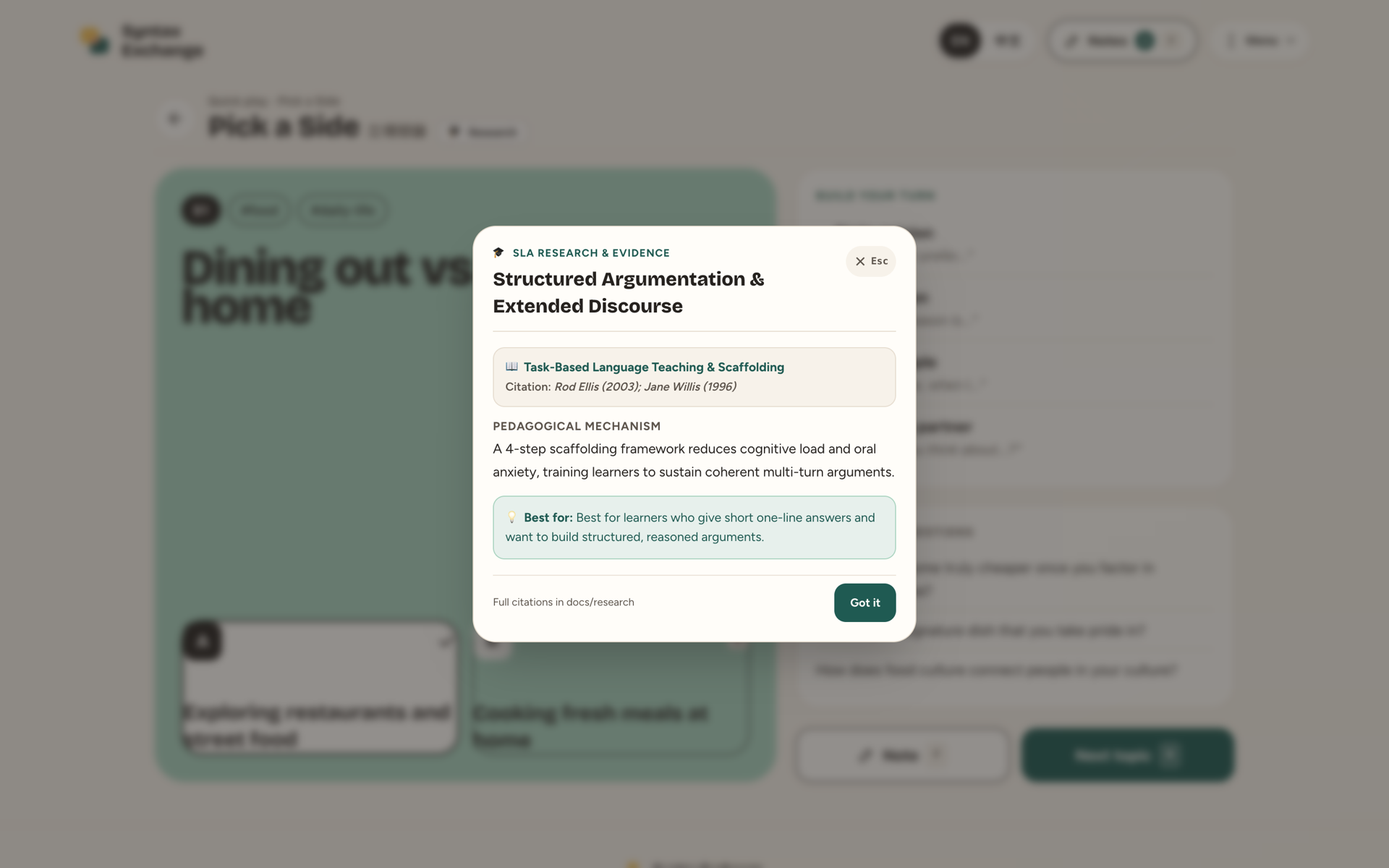
In-app SLA research card for Pick a Side

In-app: every game opens its research card with theory, citation and who it helps most.

05 · Now in beta

What you can use today

v1.7 · NowShipped
Talk it, draw it
  • 6 games, now with Describe & Draw
  • EN · 中文 · 日本語 · Español, one-click swap
  • Remote rooms; notes go to the learner
  • Practice Tree: your tree and pair trees grow as you speak
  • Google sign-in; word lists for each level, A2–C2
BetaTesting now
Shaped by real learners
  • We are testing with ESL learners and teachers right now.
  • What we build next depends on what you tell us.
  • Try a game with your partner, then share what worked and what didn’t.
Share your feedback →2-minute form
What we optimize for
North star metric

How much meaningful conversation did the pair have?

Not “how many words were memorized”. Every feature is judged by whether it helps people speak more, explain more and respond more.

The learning loop
1
Speakplay a session
2
Feedbackpartner notes errors
3
Reviewgo over your notes together
4
Practicespaced review with read-aloud
5
Speak againuse what you reviewed next time
Already in the app: Practice Tree: active practice minutesPair trees: a balance meterNotes → spaced reviewNo scores, no streaks
Syntax Exchange

Speak more.
Explain more.
Respond more.

From isolated words to intuitive syntax. From syntax to fluency.

Share your feedbackQR code: Syntax Exchange feedback form
EN 中文 日本語
01 / 18